In today’s cloud-driven world, businesses require applications that can scale quickly, run seamlessly anywhere, and remain reliable. That’s where containers come in — they package your app with everything it needs, making it portable and consistent across environments. AWS ECS (Elastic Container Service) plays a key role here, helping organizations run and manage these containers efficiently in the cloud.
But managing hundreds of containers manually is a challenge. This is where Amazon Elastic Container Service steps in. ECS takes care of running, scaling, and managing containers for you, so teams can focus on building apps instead of handling infrastructure.
AWS ECS Overview
It is a fully managed service that helps you run and scale containerized applications on AWS. At its core, ECS organizes your containers into clusters, defines how they should run, and ensures they remain healthy.
In the next sections, we’ll break this down into simple parts — clusters, tasks, and services — so you can clearly see how ECS works under the hood.
What You’ll Learn?
By the end of this post, you’ll understand:
- What AWS ECS is and why it’s used.
- How it works — clusters, tasks, and launch types.
- Who handles patching (AWS vs you)?
- Why patching is critical for security and stability.
- Practical Setup: Deploy Nginx on Amazon ECS (Fargate)
What is AWS ECS?
Amazon Elastic Container Service is a fully managed service that helps you run and scale Docker containers on AWS. Instead of worrying about provisioning servers and managing container workloads manually, it handles the heavy lifting.
Teams use ECS because it offers:
- Scalability – run from one container to thousands.
- Simplicity – no need to manage complex infrastructure.
- Seamless AWS integration – works smoothly with services like IAM, CloudWatch, and ALB.
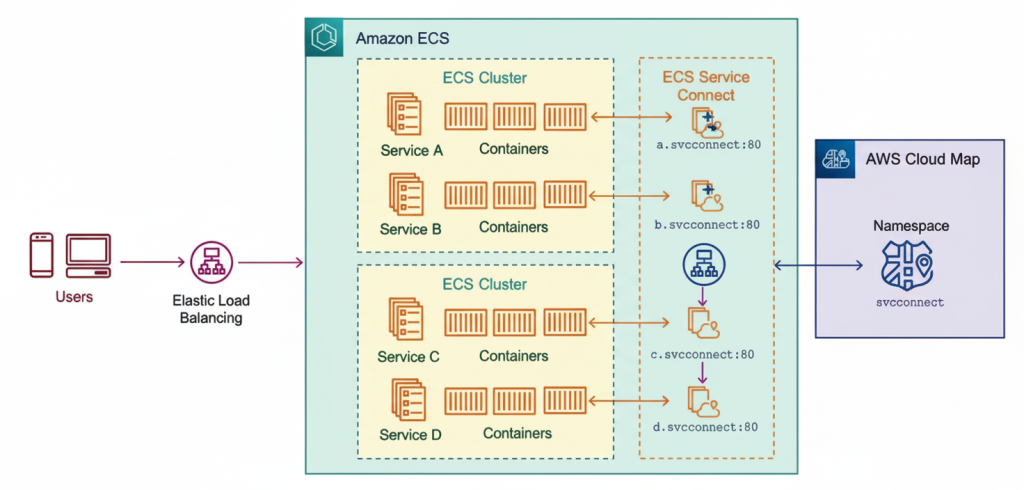
In short, ECS enables faster and easier container management, while also providing tight integration with the AWS ecosystem.
How ECS works — clusters, tasks, and launch types
ECS may seem complex at first, but it really boils down to three main parts: clusters, tasks, and launch types.
1. Clusters
A cluster is a pool of resources where your containers reside. This pool can consist of:
- EC2 instances (your own servers that you manage and update).
- Fargate (serverless computing where AWS manages the servers for you).
2. Tasks
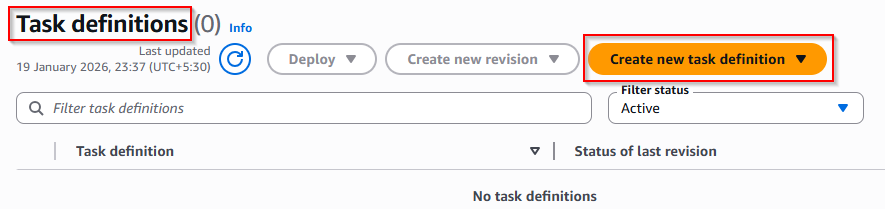
A task is the running container inside ECS. It’s defined by a task definition, which acts like a recipe. It tells ECS which container image to use, how much CPU and memory it needs, and which ports to expose.
3. Launch Types (Infrastructure options)
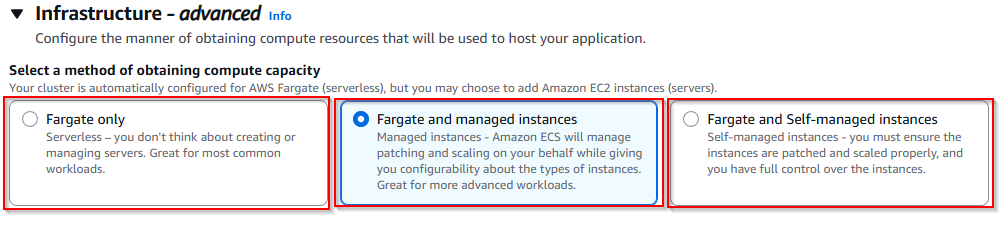
This explains how to provide the compute capacity for running the ECS tasks.
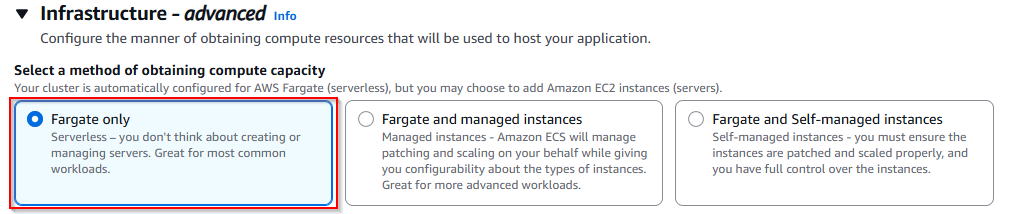
- Fargate only: Containers run on AWS-managed, serverless infrastructure. You don’t need to create and manage the EC2 instances. This option is best for the common workloads.
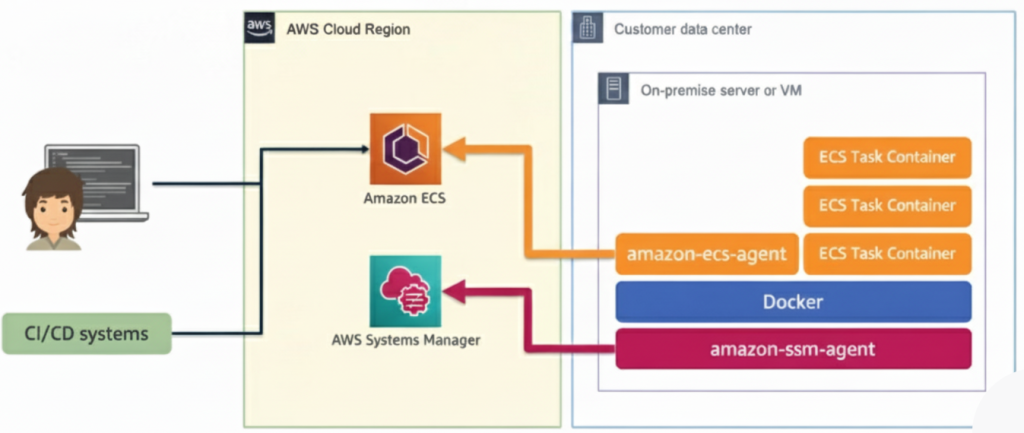
- Fargate and Managed Instances(New feature): This is a mixed approach where tasks run on Fargate and the managed instances. AWS handles patching and scaling of instances while you get more control over configuration.
- Fargate and Self-managed Instances: In this, the tasks can run on Fargate or your own EC2 instances. You are responsible for managing, patching and scaling the EC2 instances. This gives you full control over the infrastructure.
🔑In summary, it schedules your tasks inside a cluster using the selected launch type, and then manages their health, scaling, and connectivity.
Who handles patching (AWS vs you)?
One of the biggest sources of confusion in ECS is understanding who is responsible for patching what. Here’s the breakdown:
With Fargate only
- AWS manages the infrastructure behind the scenes.
- The servers, networking, and ECS agent are patched automatically.
- Your job is to keep your container images updated with the latest libraries, runtimes, and app dependencies.
Fargate and Self-managed Instances
- You own the EC2 instances in the cluster.
- That means you are responsible for patching the OS, ECS agent, and any security updates.
- AWS’s job is to provide ECS as the orchestration layer and offer the updates; however, you must apply them.
Now AWS has introduced a new way to manage them. It’s called Amazon ECS Managed Instances — and it’s changing the way we manage container infrastructure on EC2.
So, what’s new with ECS Managed Instances
🔹 Simplified Management – AWS now handles the EC2 host setup, scaling,
and patching for you.
🔹 EC2 Flexibility + Fargate Simplicity – You still choose instance types, AMIs, and networking, but without manual configuration.
Why patching is critical for security and stability
Patching is a vital part of maintaining any computing environment, including ECS clusters. Here’s why it matters:
✅ Protects against security vulnerabilities
✅ Ensures system stability
✅ Maintains compatibility
✅ Compliance and best practices
In short, patching is not just a routine task—it’s essential for security, reliability, and long-term efficiency of your ECS clusters.
Practical Setup: Deploying Nginx on Amazon ECS (Fargate)
✅ Step 1: Create an ECS Cluster
Go to: AWS Console → ECS → Clusters → Create cluster
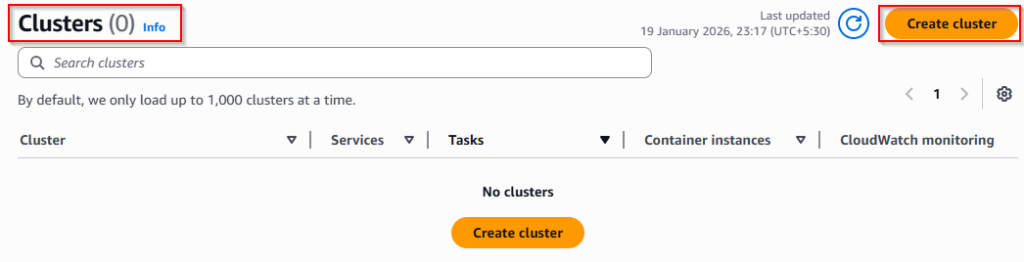
- Now select: Fargate only (Serverless)
- Note: I selected Fargate only because this setup was intended for testing and practice purposes. You can choose the option based on your own requirements (for example, Fargate + EC2), depending on your use case.
✅ Step 2: Create the Task definitions
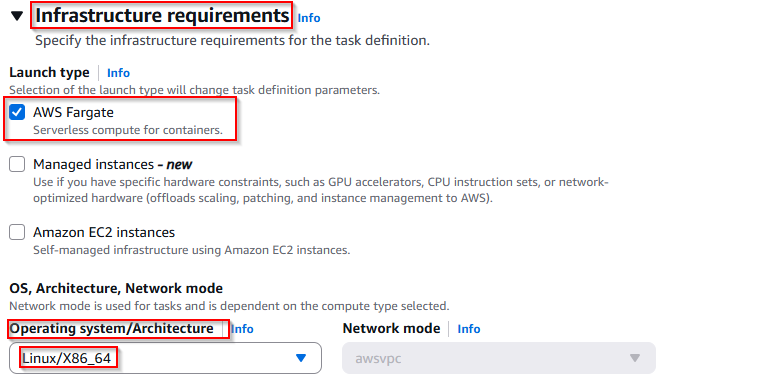
- Launch type: AWS Fargate
- Operating system/Architecture:
Linux/X86_64
This prepares the environment where your container will run.
Now create your container details:
- Container name: nginx
- Image URI: nignix:latest
- Essential container: Yes
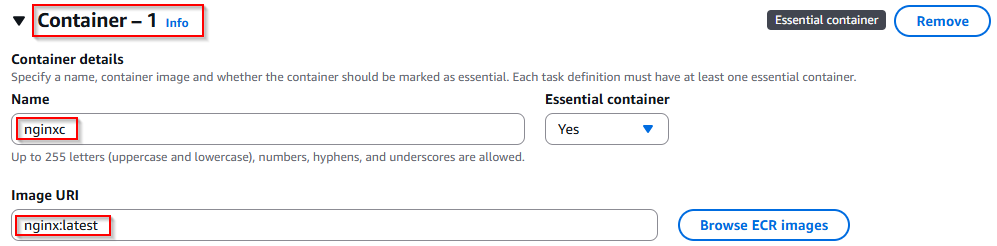
This pulls the official Nginx image from Docker Hub and runs it inside ECS.
✅ Step 3: Create a Service in ECS
After the cluster and task definition, open: ECS Cluster → Services → Create

In the Task definition family, select: MyTask (Which we have created)
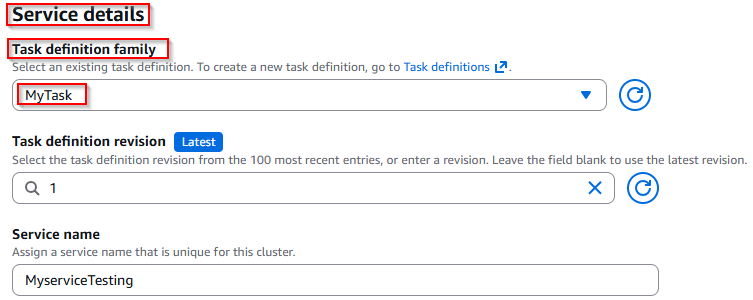
Select the compute configuration:
- Launch type:
FARGATE - Platform version:
LATEST
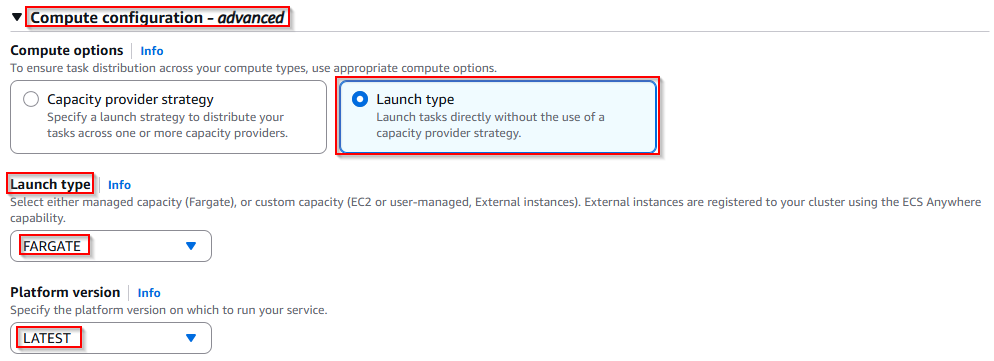
A service ensures your container stays running and ECS maintains the task automatically.
Now, in the Networking section, while creating the ECS service, I configured the security group to allow web traffic.
✅ Under Inbound rules for security groups, I added:
- Type:
HTTP - Port range:
80 - Source:
Anywhere (0.0.0.0/0)
This allows the Nginx container to be accessed from the internet.
✅ After that, I enabled:
- Public IP:
Turned on
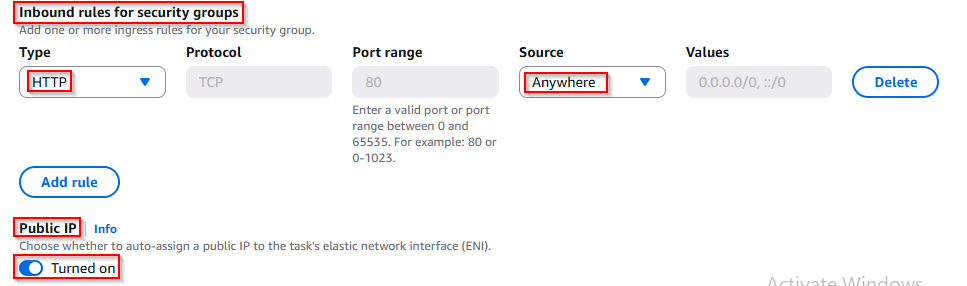
This assigns the ECS task a public IP address, allowing me to access the Nginx page in my browser using the IP address.
✅ Now create the service.
✅ Step 5: Access Nginx Using Public IP
After the service becomes Active, go to: Service → Networking
Copy the Public IP address, then open it in your browser.

✅ You should see this output:
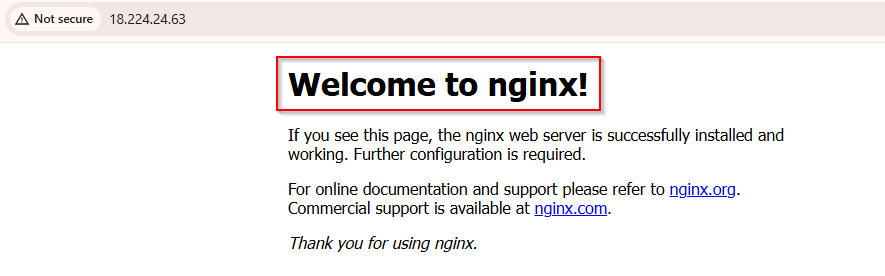
Welcome to nginx!
This confirms that your container is successfully deployed and running on ECS Fargate.
Case Studies: ECS Patching in Action
1. E-Commerce Platform
An online store runs its web application on an ECS cluster. A critical security vulnerability is discovered in the underlying OS. Because the cluster was regularly patched, the platform updated instances quickly without downtime, protecting customer data and avoiding potential financial loss.
2. Microservices-Based SaaS
A SaaS company uses ECS to deploy multiple microservices. One unpatched container instance caused intermittent service failures, affecting several users. After implementing a regular patching routine, the team ensured all instances were up-to-date, improving reliability and user experience.
3. Finance Sector Compliance
A financial services firm must comply with strict data security regulations. Regular ECS cluster patching helps them meet audit requirements, secure sensitive customer information, and avoid regulatory penalties, all while keeping services stable and responsive.
Conclusion
Maintaining your ECS clusters through regular patching is essential for security, stability, and compliance. While understanding the theory behind patching is the first step, seeing its impact in real-world scenarios shows why it cannot be ignored. By following best practices—like keeping container images updated, monitoring performance, and securing your cluster—you can ensure your applications run smoothly and safely.
At Cloud Jiva, we aim to bring you easy-to-understand guides and practical insights on AWS and cloud technologies. Stay tuned for our next blog, where we’ll dive deeper into ECS with hands-on examples and real-world use cases!